
Home » Register

BAJEE Register: Create Your Account Fast on Mobile
Register your BAJEE account quickly with trusted mobile-first steps and support
Ready to start? The BAJEE register flow is built for fast, secure mobile signup. Use your real details so verification is smooth and payouts are hassle-free. Start from the BAJEE Official Website to avoid lookalikes and keep your data safe.
Create your account in minutes, then enjoy cricket markets, JILI slots, and live features that load fast on local networks. Keep one profile, one wallet, and quick access on every device you use.
Why creating a BAJEE account gives you speed, safety, and better play
Register once, then get faster access, stronger security, and tools tuned for mobile.
Quick mobile onboarding with OTP confirmation
Sign up with your phone number and confirm with a one-time code. It’s fast, light on data, and works on spotty connections.
Strong verification and exact-name payouts
Enter your legal name and date of birth. When your profile matches your wallet name, withdrawals move faster with fewer checks.
Personalised lobby for cricket and JILI favorites
See popular cricket matches, JILI slots, and saved picks first. Your homepage adapts to what you play most.
Light app tools, built for low storage phones
Enjoy quick bet slips, auto odds updates, and easy search. Features are designed for smaller screens and limited storage.
Local support that knows the games you play
Chat or message support during peak match hours. Get clear answers about verification, limits, and settings.
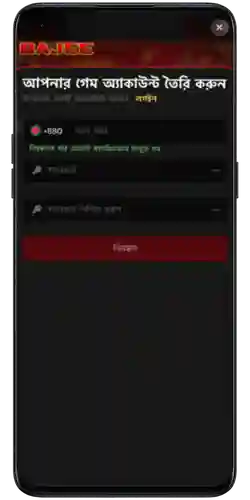
Follow these simple mobile steps to sign up and verify your profile
- Tap Register and enter your mobile number. Use the correct country code if needed.
- Confirm the OTP sent to your phone to secure your new account.
- Create a strong password and set a backup PIN or security question.
- Type your full name and date of birth exactly as on your ID or wallet.
- Choose BDT as currency and set your local time zone for match schedules.
- Agree to the terms, then review and submit your details.
- Optional: Enable two-factor authentication and add a recovery email.
Smart account setup tips for BD mobile users and faster local payouts
Match your profile name to your wallet details
Use the same full name everywhere. It helps approvals and keeps withdrawals moving without back-and-forth checks.
Build strong password habits on mobile
Use 12+ characters with letters, numbers, and symbols. Avoid birthdays. Change it every few months and keep it private.
Turn on alerts for match starts and settled bets
Enable notifications so you never miss cricket toss updates, innings breaks, or settled results while on the go.
Deposit and withdrawal setup for local wallets
Add your preferred method and confirm a small test transaction. Supported options include bKash, Nagad, Rocket, and Upay, plus local bank transfer.
Install the app for lighter data use
Use the official app for quicker loading on mobile data and older phones. You’ll find it under BAJEE Download in the menu after login.
The advantages of registering on BAJEE for games, bonuses, and control
Registration unlocks priority access to cricket odds, JILI and other top slots, and early markets before big matches go live. Your settings, limits, and favorites stay synced across devices.
Members also get bonus access, faster verification checks, and tailored offers. Explore seasonal deals inside the offers hub labeled BAJEE Promotions for the latest rewards.
- Faster checkouts with saved preferences and quick bet slips.
- Exclusive member bonuses and odds boosts on key matches.
- Personalized lobby with your favorite leagues and slots.
- Smarter tools like bet history, limits, and reminders.
BAJEE registration FAQs for new members starting on mobile today
How long does BAJEE sign up usually take?
Most users finish in a few minutes. OTP confirmation is instant, and basic verification completes soon after first login.
Do I need NID or passport to create a BAJEE account?
Not always at sign-up. Higher limits or withdrawals may request ID photos. Keep a clear NID or passport ready if asked.
What should I do if I don’t receive the OTP?
Wait 60 seconds and request a new code. Check signal and SMS inbox. If needed, switch to call verification or contact support.
Can I change my mobile number after opening my account?
Yes, from profile settings. You’ll verify the new number with an OTP. Keep your old number active until the switch is confirmed.
How do withdrawals work for new members?
First verify your name and set a payout method. After approval, withdrawals to local mobile wallets and banks process within stated times.
Ready to create your BAJEE account and start playing with confidence
Join today and move from sign-up to first bet in minutes. Keep your details accurate, set limits, and enjoy cricket and JILI with control.
It’s the right moment to begin the BAJEE register flow and lock in your spot. Set up once, and enjoy faster access every time you return.